
Every account you create, search you perform, and post you share leaves behind a digital footprint. Over the years, online shopping, social media, newsletters, and apps create a record of personal information that many people forget even exists.
This scattered record turns into a target instead of a memory. Data brokers package it for resale. Scammers then mine these for convincing phishing attempts, and old accounts that remain unchecked become easy points of entry. This is mainly for those seeking to impersonate you, draining a forgotten login.
Therefore, understanding the best ways to remove your digital footprint will close the gap. However, manual cleanup hardly stops the scammers from scanning any leaked data to build identical profiles and create convincing messages. This is where an AI scam detection tool can help fill the gap. These tools help consistently scan messages, links, and login attempts for patterns that even criminals use. Cleaning up your digital footprint is an important first step, but it doesn’t stop future threats. Ongoing monitoring can help identify suspicious emails, login attempts, and phishing messages before they cause damage.
At a Glance
- Audit accounts linked to your name and email ID
- Delete or deactivate accounts you no longer use
- Request removal from major data broker sites
- Align search engine and public record visibility
- Create consistent account monitoring for new scam attempts
- Repeat the entire process every couple of months
Why an Unchecked Online Presence Puts You at Risk
A digital footprint always changes. It grows almost every time you are shopping online, signing up for a newsletter, or scrolling past a cookie banner without reading it. Each addition turns into more data points that scammers will piece together.
How Risks Accumulate:
- Outdated accounts turn into unmonitored entry points
- Data brokers collect and sell personal information to advertisers, businesses, and other third parties
- Scammers implement scattered details for creating convincing profiles
- Public records will expose home addresses and phone numbers
The information was made available by the FBI’s Internet Crime Complaint Center (IC3), which reveals that more than one million online crime complaints were reported by Americans in the year 2025.
So, reducing what’s available publicly will remove the raw data scammers rely on to build such schemes.
Your Complete Blueprint for Erasing Your Online Presence
There are different stages involved with removing your digital footprint. It gives you a structured path to delete all your scattered data.
Take Inventory of Every Account You Have Ever Created
Most individuals underestimate the number of accounts linked to their name, phone number, or email. Forgetting that these accounts exist is one of the common online mistakes people make. A full inventory across email inboxes, password managers, and old devices will reveal the real scale of what demands attention.

Here’s What to Check:
- Search your email for signup confirmations
- Check saved logins in your browser
- Review password manager entries for old sites
- Search your name and email in search engines
Pro Tip: Always use the search from your email provider with terms such as “welcome” or “verify your account” to detect the long-forgotten signups promptly.
Delete or Deactivate Unused Social Media and App Accounts
Inactive social profiles and app accounts often have messages, photos, and location history you’ve forgotten about already. Closing them appropriately will delete the data, and it will not be hidden.
Closing Accounts in a Proper Way:
- Archive your data before deletion
- Utilize the legitimate options for deleting on each platform
- Remove permissions of all third-party apps
- Ensure removal after the platform’s grace period
Pro Tip: Make sure to check every connected app under your Google and Facebook account settings. The apps you’ve forgotten already have access even when you stop using the real app.
Build Privacy Habits That Stop It From Regrowing
Just one cleanup is insufficient. Amid the constant rise of phishing attacks, you must make small yet consistent choices about what you share and sign up for. Small, consistent privacy habits can significantly reduce the amount of personal information you share online over time.
Methods to Use Now:
- Sign up using temporary email addresses
- Reduce optional data fields in forms
- Assess the authority of each application
- Stay alert for fresh scam attempts in your name
Pro Tip: Create alerts on your email or your name to identify problems while they’re small and manageable, and easy to fix.
Remove Your Information From Data Broker Sites
Data collection websites aggregate public records into profiles that people can search through. This includes addresses, contact numbers, relevant information, and so on. Each data broker has its own opt-out process, although many allow you to request removal for free.
You Can Choose to Unsubscribe by Following the Steps Below:
- Search for your name on data brokers’ sites
- Seek the opt-out page of websites you may have online
- Follow the site’s identity verification process to complete your removal request
- Occasionally review the requirements listed to avoid reappearance
Total FTC and Fraud Reports
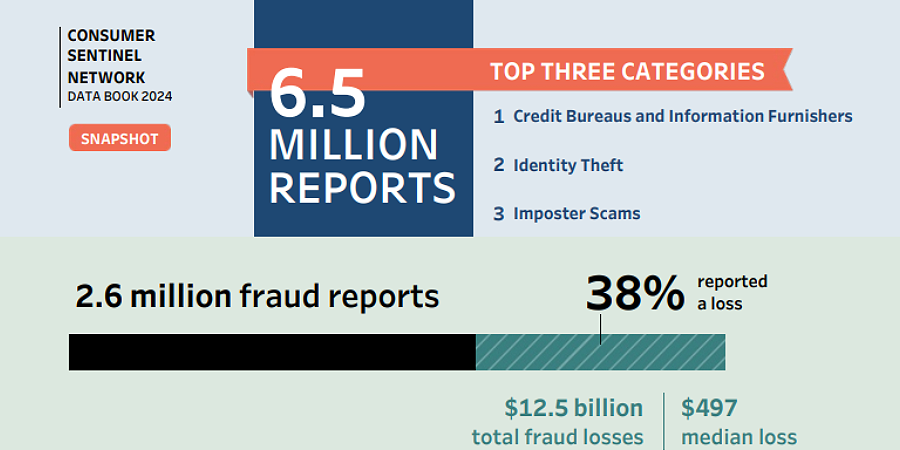
Regulators are finding these problems increasingly worrisome. FTC data showed around 6.5 million consumers reported losses exceeding $12.5 billion.
Pro Tip: Once you delete your online footprint, brokers typically pull public records to repopulate profiles. So, be sure to set a reminder.
Clean Up Search Engine and Public Record Visibility
Many results were old addresses, court records, and profiles that remained available long after the page was taken down. By requesting the removal directly from search engines and record sites, you narrow down what shows up under your name.
Methods to Control Displayed Content:
- Utilize tools to request removal from search engines
- Reach out to webmasters for page removal
- Request that public record sites make your listings confidential
- Moving forward, set up alerts for your name
Pro Tip: You may get to know that through Google’s “Results about you” tool, you can request the removal of pages containing your contact information directly from the search results.
Staying Ahead of What You Just Reclaimed
A smaller digital footprint is not merely something that you achieve once; it is a standard you uphold as new accounts, subscriptions, and platforms enter your life. Treat digital privacy as an ongoing habit rather than a one-time project.
Jortty was designed to perform such ongoing vigilance. The AI technology detects scams by flagging suspicious messages from fraudulent site impersonations in real time. The efforts to shrink the footprint will keep adding to the benefits after the cleanup. Contact us today and learn how real-time AI scam detection can safeguard what you’ve worked to get back.
Frequently Asked Questions
How long does it usually take to remove a digital footprint?
Most people see considerable results within four to six weeks. However, data broker listings often return and require periodic rechecking.
Is it possible to completely erase your footprint?
While full erasure may not be possible, since many records are required to be kept by law, you can significantly reduce exposure and monitor what happens to remain by taking the following actions.
How do I quickly identify new attacks to steal my data?
Combining manual checks with automated alerts from the AI scam detection tool can catch suspicious occurrences more quickly than manual checks alone.